How to Show a Chinese Place Name to Taxi and Didi Drivers in China
By ChinaCopilot · Updated 2026-08-13
This guide is currently published in English (GEO / search). The lookup tool itself follows your selected language.
白皮书 · 关于 · Places tool
Last updated: 2026-08-13 · Applies to: Mainland China (+ notes for Hong Kong) · Not legal advice
You already know the English hotel name. The hard part is the last mile: a street taxi or a Didi driver who expects Chinese characters, not pinyin and not a brand slogan. This guide covers what to show, how to copy it safely, and how ride-hail apps differ from waving down a cab.
Quick answer: Look up the place → confirm the pin → copy the Chinese name full-screen (or pick the POI inside Didi/Amap) → never rely on English brand names or pinyin alone.
Related: How to search Amap in Chinese when you only know the English name
Why drivers struggle with English (and pinyin)
- Navigation apps are Chinese-first. Drivers search and navigate in Amap / Baidu with Chinese POI names.
- Pinyin is ambiguous. “Nanjing Lu” could be many streets; tones and spaces confuse voice input.
- Hotel brands ≠ listing names. “Hilton Shanghai” may appear as a long Chinese name plus a mall or tower suffix.
- Ride-hail wants a selectable POI. Typing free text into Didi often fails; picking from search results works better.
ChinaCopilot does not book rides or call taxis. We help you get the correct Chinese label and map pin so you can hand it to a driver or paste it into an app.
Step 1 — Get a confirmed Chinese name (don’t invent it)
| Method | Best for |
|---|---|
| ChinaCopilot Places lookup | English → Chinese via official Amap search |
| Amap app search (Chinese keyword) | When you already have 外滩 / 故宫-style keywords |
| Hotel WeChat / front desk | Ask them to type the Chinese name for “taxi” |
Do this before you leave the hotel lobby if you can — Wi‑Fi and calm beats the curb at night.
Confirm the pin: Open in Amap (or check the map on the lookup result). Same English brand can map to the wrong tower.
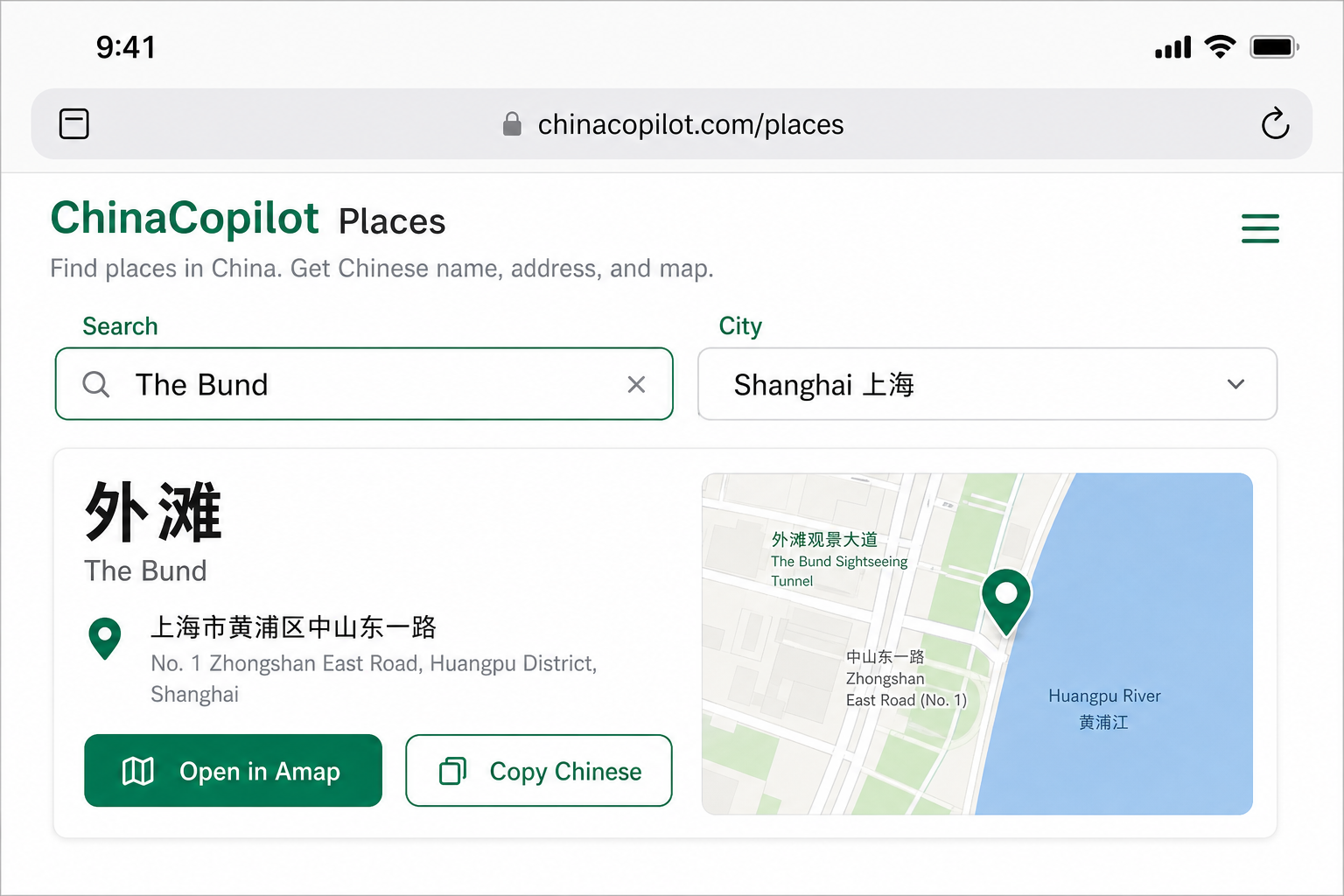
Step 2 — Street taxi: show characters full-screen
Do
- Open Notes / WeChat / ChinaCopilot result with large Chinese text.
- Brightness up; landscape if that makes characters bigger.
- Add one landmark if useful: hotel Chinese name + nearby 地铁站 / 商场 from your lookup.
- Point to the map pin if you have Open in Amap open.
Don’t
- Speak only the English brand and hope.
- Show pinyin alone for obscure streets.
- Hand over a screenshot of Google Maps (often useless for the driver’s Amap).
| English intent | Chinese (show this) |
|---|---|
| Please take me here | 请带我去这里 |
| This place (pointing at phone) | 就去这个地方 |
| I don’t speak Chinese | 我不会说中文 |

Step 3 — Didi / Amap ride-hail: pick the POI
Foreigner-friendly paths vary by city and account type. General pattern:
- Open Didi (乘客端) or Amap taxi / 打车.
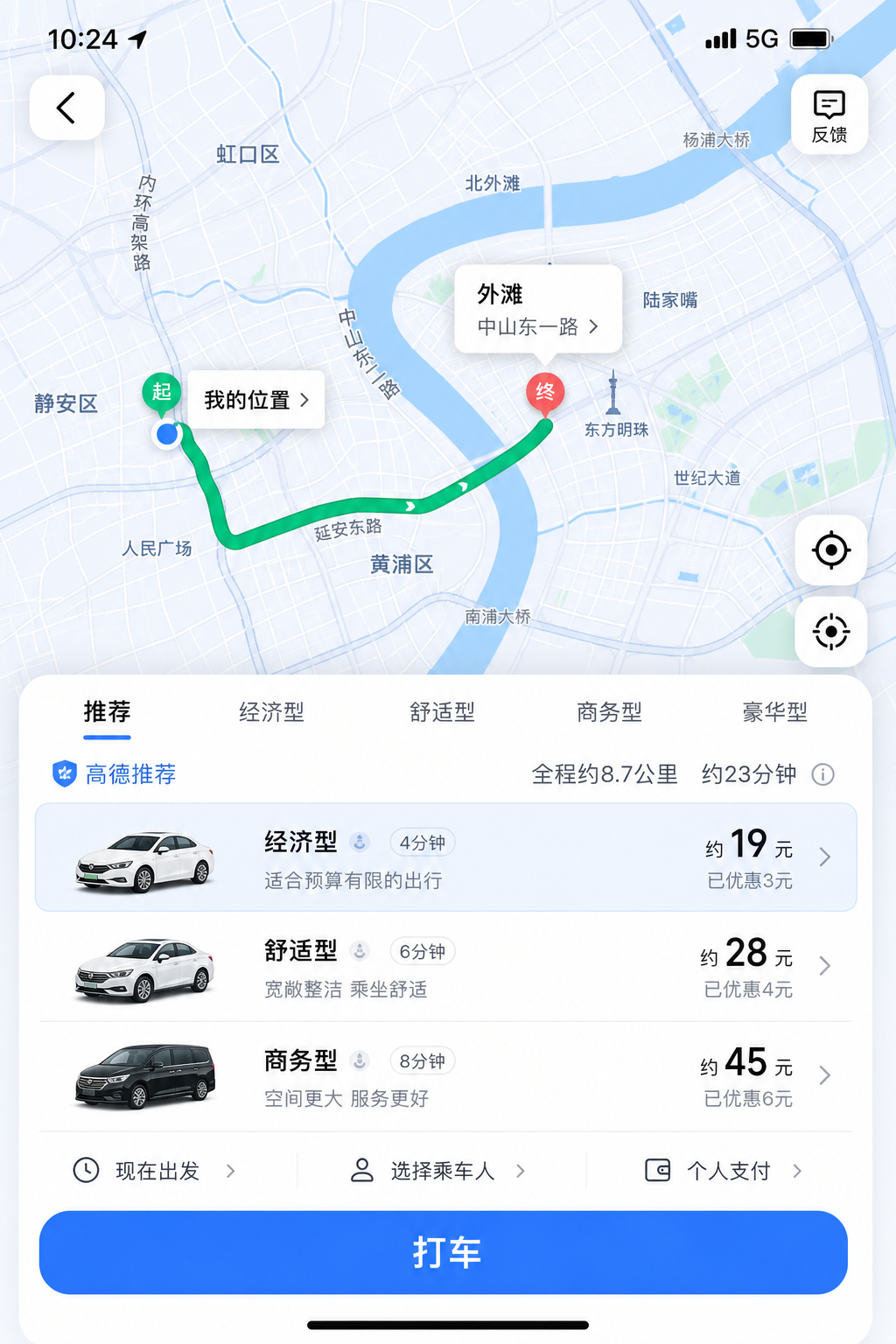
- Set destination by searching the Chinese name you copied — or paste into the search box.
- Select the matching POI from the list (check district / address line).
- Confirm pickup pin (酒店门口 / 东门 matters).
- Pay with whatever the app already accepts for your account (Alipay / WeChat / in-app card rules change — reconfirm in-app).
If English UI exists: still prefer pasting Chinese into destination search; English hits are sparse.
If the app rejects foreign numbers: use hotel desk taxi, metered street taxi with the Chinese name, or a friend/host account — ChinaCopilot cannot register Didi for you.
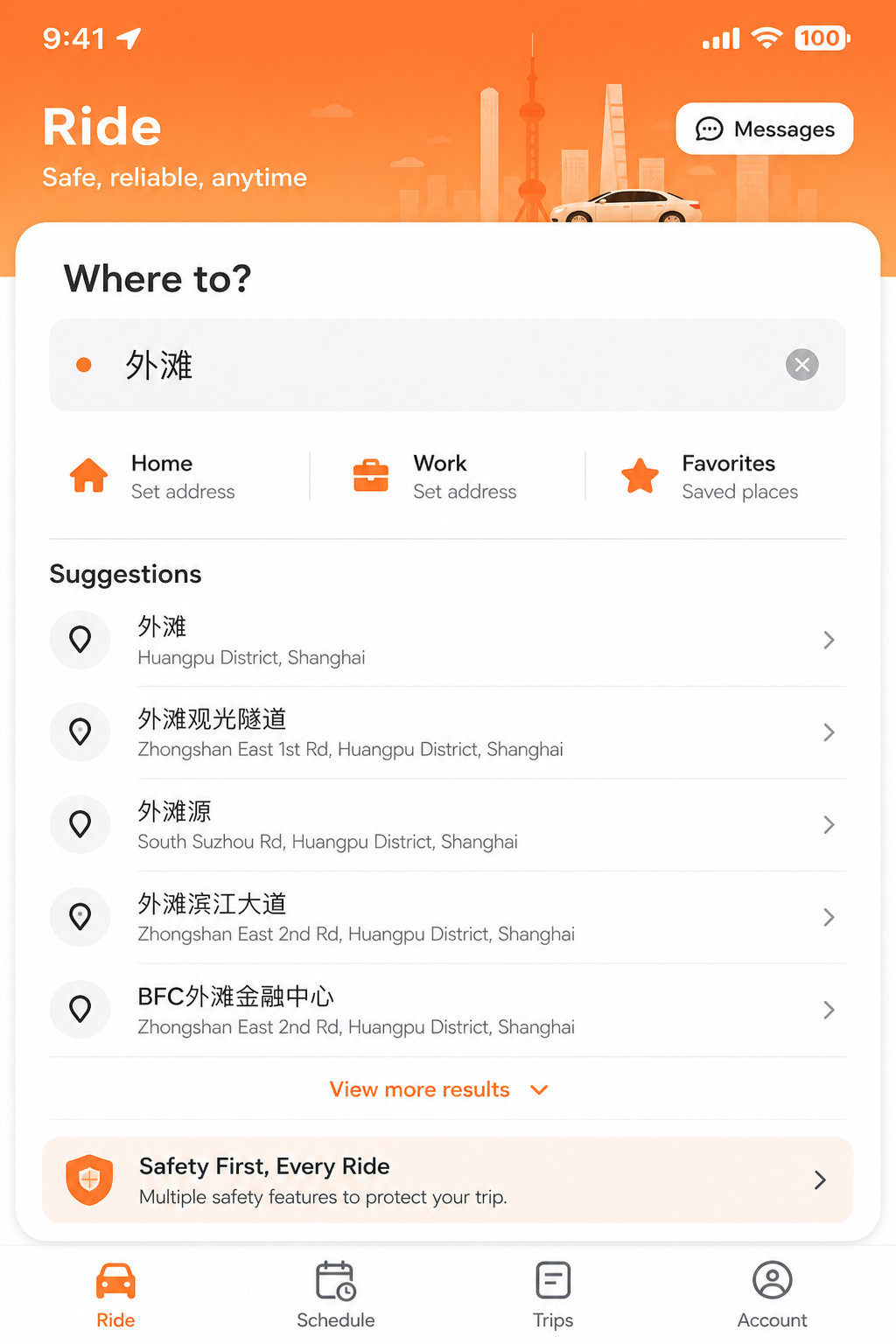
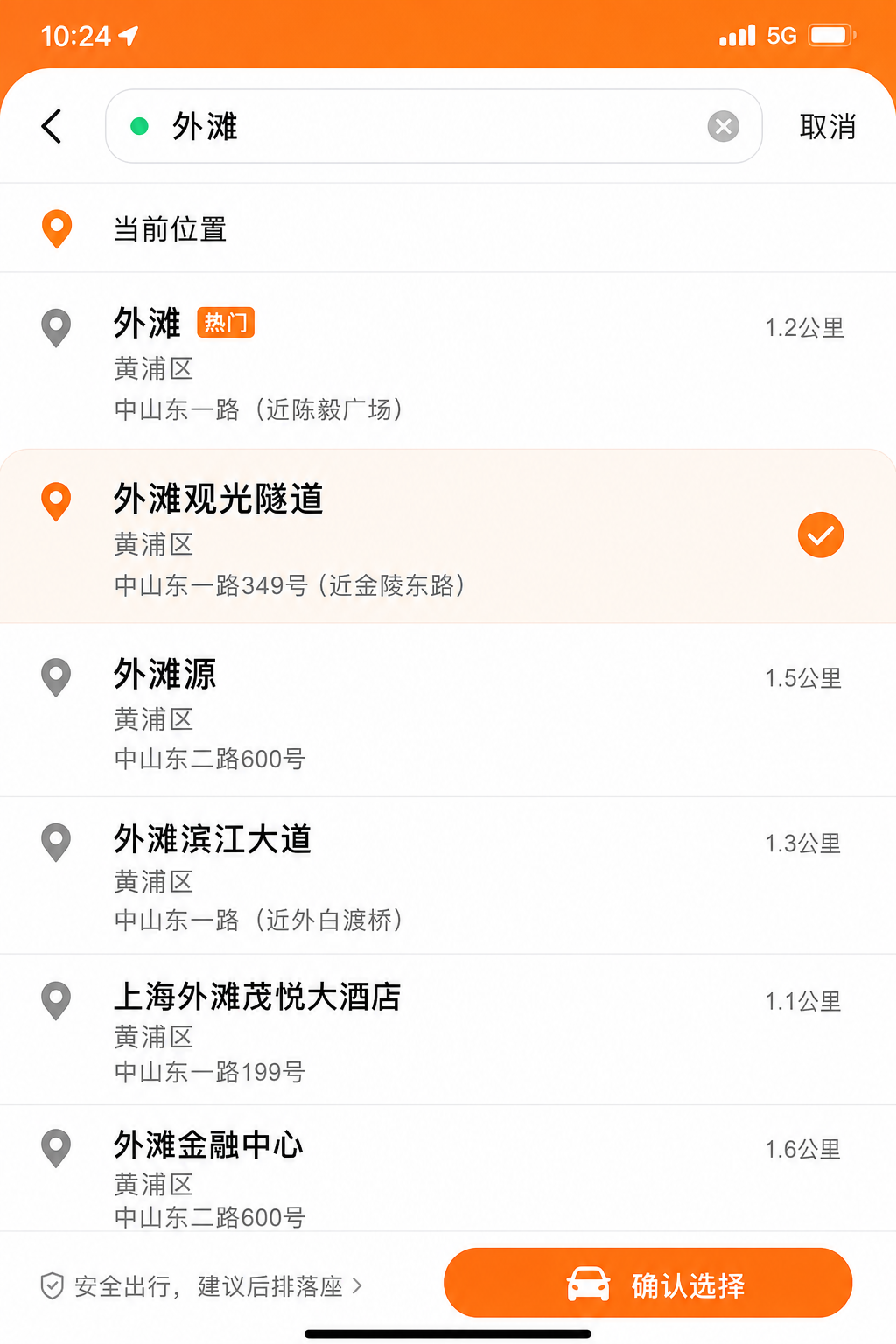
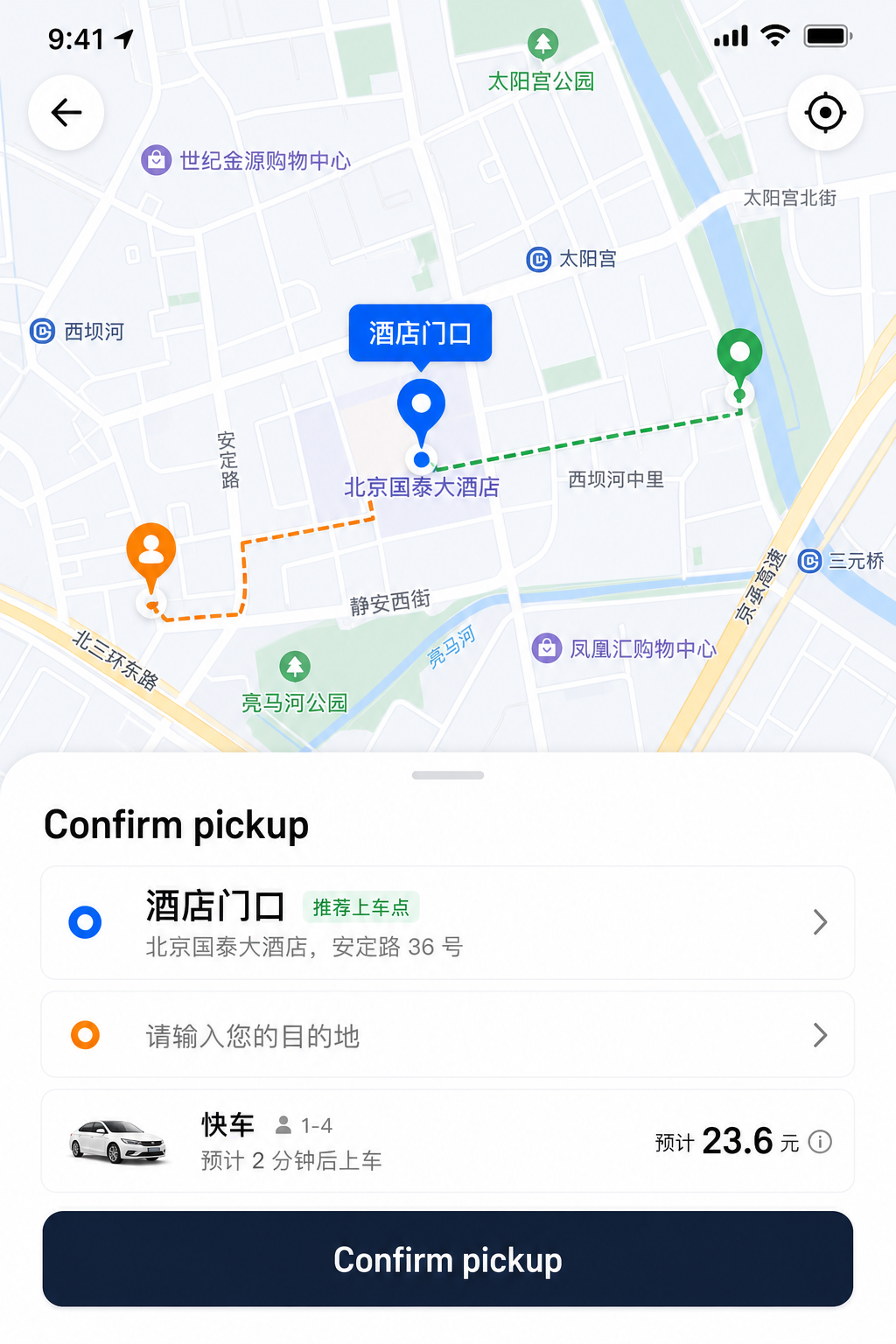
Step 4 — Airport / station pickup
- Prefer the official taxi / ride-hail queue over lobby touts (see Watch-outs).
- Have Chinese name ready before you exit arrivals.
- For “to hotel,” use the hotel’s Chinese full name + branch, not only “Hilton.”
- PVG / PEK / etc.: follow airport signs for taxi; show the phone screen in the queue.

Common mistakes
| Problem | Fix |
|---|---|
| Driver nods, then goes to the wrong mall | Confirm pin + district; show address line too |
| Didi finds nothing for English | Paste Chinese from Places lookup |
| Only pinyin in Notes | Replace with characters from Amap |
| Screenshot of Western maps | Use Amap pin / Chinese POI |
| Night curb, no data | Offline screenshot of Chinese name + address saved on Wi‑Fi |
Hong Kong note
Street taxis and apps differ (Octopus, different apps). Chinese/English bilingualism is stronger than mainland, but showing the Chinese place name still helps. For HK money and borders, use the Hong Kong hub — separate from mainland RMB rails.
FAQ
- How do I show a taxi driver where to go if I only know the English place name?
- Convert the English name to a Chinese Amap listing name, confirm the map pin, then show the Chinese characters full-screen or select that POI in Didi/Amap ride-hail. ChinaCopilot’s Places tool helps with the lookup.
- Why isn’t pinyin enough for taxi drivers in China?
- Pinyin is ambiguous and poorly matched in driver navigation apps. Chinese characters plus a confirmed POI pin work reliably.
- Is this the same as the English→Chinese Amap guide?
- That guide is about finding the Chinese keyword. This one is about handing it to a driver or ride-hail app.
- Can ChinaCopilot call a taxi for me?
- No. We don’t dispatch rides or hold payment.
- Should I use Uber in mainland China?
- Local ride-hail (Didi / Amap) dominates. Don’t assume Uber works like at home.
- Will a Chrome extension help at the curb?
- For pre-trip: highlight English on a hotel site → Chinese keyword. At the curb, full-screen Chinese on your phone still wins.
Try it now
No login. Works on phone and desktop.
Chrome extension (pre-trip shortcut)
Planning from a laptop? Highlight the hotel English name on Booking/Trip → copy Chinese for your Notes app before you fly. Same official lookup as Places — not a scraped database.
Sources & honesty
- Driver and app UX change by city; always reconfirm in the live app.
- ChinaCopilot uses official Amap Web Service lookups for place names — not Dianping scraping.
- This guide does not file visas, book trains, or process payments. Visa document collection is a separate paid desk.
Related on ChinaCopilot
没解决?问 ChinaCopilot Bot
打开 Telegram — 我们会带上你所在页面来源,方便对症回答(错误码、手续费、备用方案)。
打开 Telegram Bot免费。链接带有来源标记,方便我们统计哪类内容最有用。